Cue

Audiobooks · Plex · Audiobookshelf

Built for books,
not just songs.

Cue plays the audiobooks on your Plex or Audiobookshelf server with everything a book needs: chapters, speed, Smart Resume and a history of every place you’ve been. In the same app as your music, on your iPhone, in the car, on your wrist or on Sonos.

Coming soon to the App Store Why Cue
  • iPhone
  • CarPlay
  • Apple Watch
  • Sonos
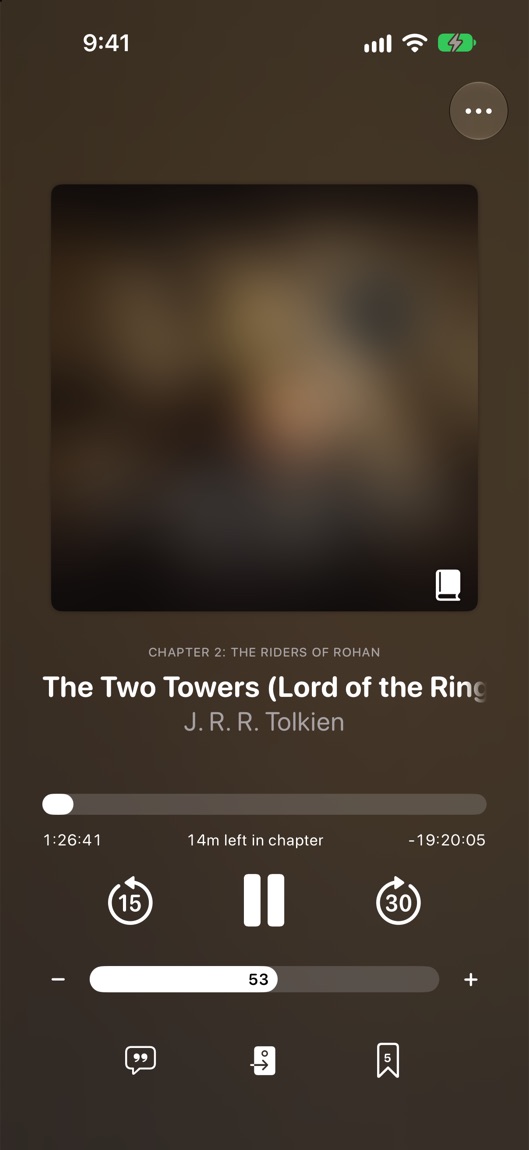
Cue playing an audiobook, with the chapter over the title and 15 and 30 second skips
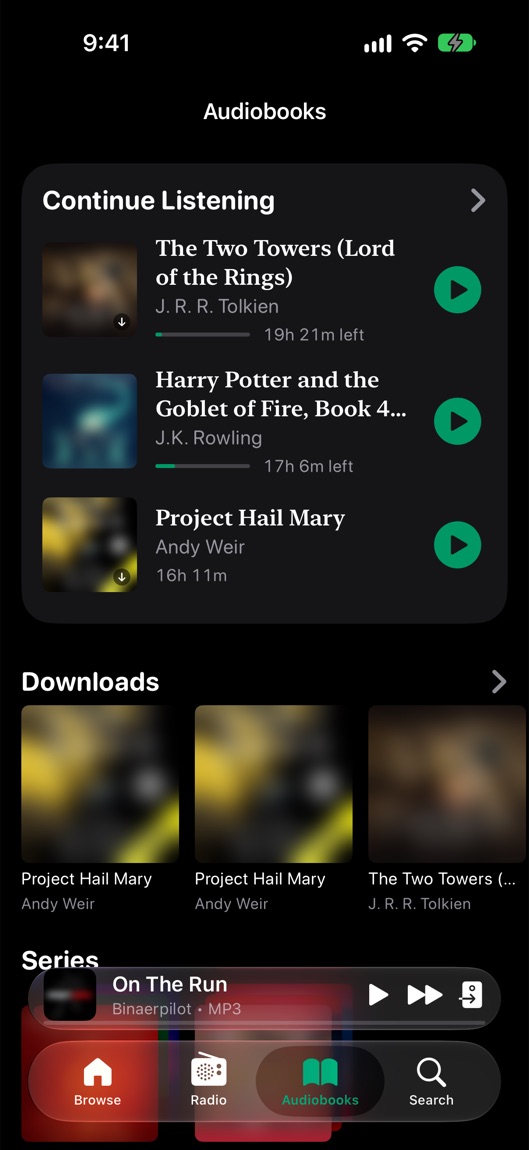
Cue’s Audiobooks tab: Continue Listening, then downloaded books
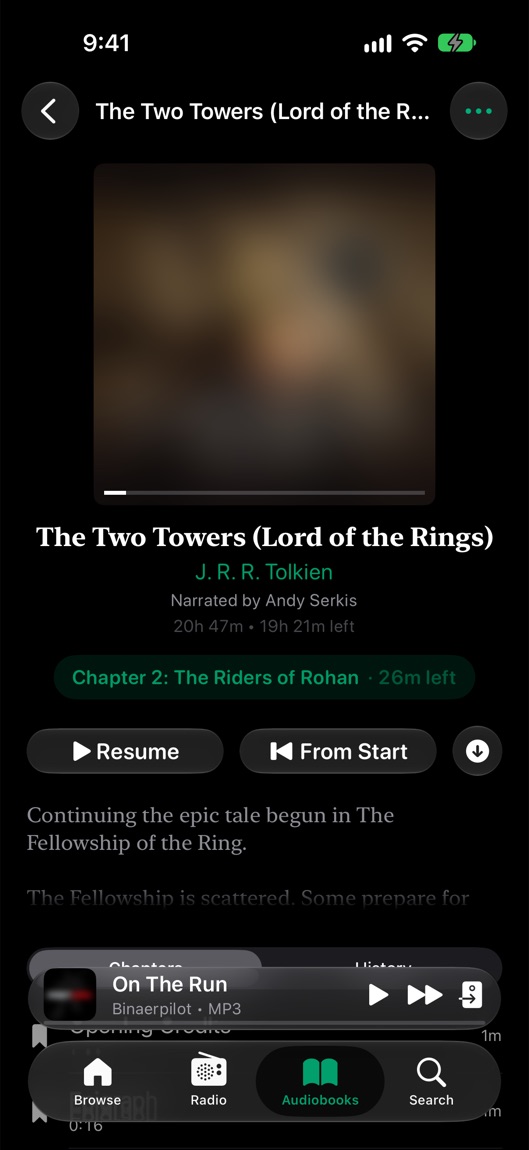
A book’s page in Cue, with its narrator, the chapter you’re in, Resume and From Start

One app, not three.

A book app, a music app and the Sonos app, folded into one player that keeps your place in all of it.

Smart Resume

Pick up mid-thought, never mid-word.

Press play after a pause and Cue goes back just far enough to catch the thread: a second after a quick pause, up to 15 seconds after a day away. Then it listens for a pause in the speech and starts there — at the end of a sentence after a longer break.

  • Never goes back past the start of the chapter
  • No rewind when you moved the place yourself
  • On your iPhone, in the car and on Apple Watch
Paused 3 hours ago Back 11 s
Back by how long you were away, then into the nearest pause between sentences.

Read Along · Cue Super

See every word as it’s read.

Open the transcript and the narration appears line by line, each word lighting up as it’s spoken. It’s written out on your iPhone, a few minutes ahead of you, from the book you’re streaming or the one you downloaded. Nothing is uploaded anywhere.

  • Tap a word to look it up in the dictionary
  • Hold a line to play from there, copy, share or translate
  • Your choice of typeface, size and spacing
  • Try it free for 30 seconds a day
Transcribed on your iPhone as you listen. Tap any word to look it up.

History

Every place you’ve been, one tap away.

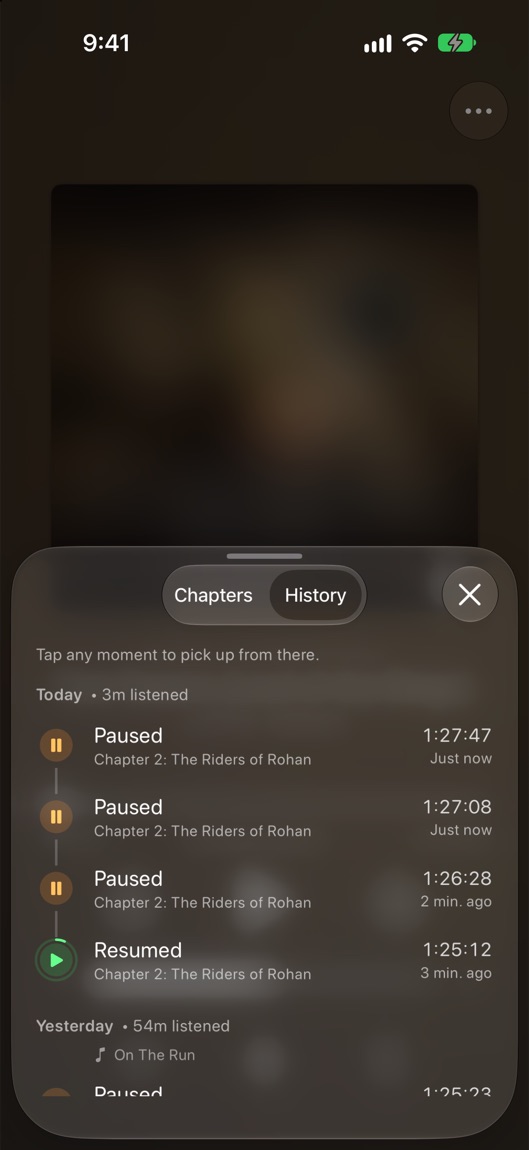
Fell asleep? Tapped the wrong chapter? Cue keeps a timeline of each book: where you started, paused and left off, every jump and scrub, and the moment another device took over. Tap any moment to go back to it.

  • Grouped by day, with how long you listened
  • Says whose place took over: your watch, Plex or Audiobookshelf
  • A swipe away from the chapters
A book’s History in Cue: a timeline of plays and pauses, grouped by day

Library

Both servers, one shelf.

Continue Listening gathers every book you’re partway through, from Plex and Audiobookshelf alike, newest first, each with its own Play button. Book pages show the narrator, the series and where you are; author pages add a photo, a biography and every book of theirs on your servers.

  • Series and narrators
  • Author pages, filled in from Audible’s catalog when your server has nothing
  • Whole books downloaded for flights, with Cue Super
Cue’s Audiobooks tab: Continue Listening, then downloaded books

Why not just a book app?

Book apps are good at books. Cue is good at books and everything around them.

Your music

The usual wayA second app, with its own queue

In CueThe same player. Back to Music picks up your playlist where it was

Sonos

The usual wayAirPlay from your phone, or the Sonos app

In CueThe Play On button sends the book to a room, your place kept in sync

After a pause

The usual wayBack a few seconds, wherever that lands

In CueBack by how long you were away, landing between words

Reading along

The usual wayBuy the ebook as well

In CueRead Along, transcribed on your iPhone as you listen

A skip you didn’t mean

The usual wayScrub around until it sounds familiar

In CueHistory has every place you’ve been, one tap back

Wherever you listen.

The same book and the same place, on every screen Cue runs on.

CarPlay

An Audiobooks tab on the car’s screen: the books you’re partway through with their progress, then every server’s shelves.

  • The chapters still to come, the one playing filling up
  • Playback speed right in Now Playing
  • Smart Resume after every stop

Apple Watch

Download books to your watch with Cue Super and leave your iPhone behind. Chapters come down in the order you’ll hear them.

  • The chapter, and where you are in it, in Now Playing
  • Your speed, and 15 and 30 second skips
  • Your place synced back to your iPhone and server

Sonos

Play a book on any room or group, and bring it back to your iPhone with a tap when you head out.

  • Chapters and your place come along
  • Your place syncs to Plex or Audiobookshelf as it plays
  • The rest of the house can keep its music

The details a book needs.

Small things, every one of them noticed by the second chapter.

Free to listen. Super to keep.

Every book on your server plays free. Cue Super adds downloads, your watch and the full Read Along.

Free

$0

  • Stream from Plex and Audiobookshelf
  • Smart Resume, chapters, speed and History
  • CarPlay and Sonos
  • Read Along for 30 seconds a day

Cue Super

Free trial

  • Download whole books
  • Books on your Apple Watch
  • Read Along with every book
  • Everything else Super adds to music and Sonos

Set up in a minute.

Plex

  1. Open Settings ▸ Services ▸ Plex and sign in.
  2. Under Audiobooks, switch on the libraries that hold your books. Albums with the genre Audiobook show up too.
  3. On your server, turn on Store Track Progress in the library’s advanced settings, so your place follows you between Plex apps.

Audiobookshelf

  1. Open Settings ▸ Services and tap Audiobookshelf.
  2. Enter your server’s address, username and password, and tap Sign In.
  3. Your books appear in the Audiobooks tab, with the ones you’re partway through first.

Questions

Which servers work?

Plex and Audiobookshelf, on their own or both at once. Plex has no audiobook library type, so Cue reads books from Music libraries you keep for books, and from albums tagged with the genre Audiobook.

Will my place match my other apps?

Yes. Cue reads your place from the server when you open a book and sends it back as you listen, so the Audiobookshelf web app or another Plex app picks up where Cue left off. When the two disagree, the newer place wins. For Plex, turn on Store Track Progress in the library’s settings.

Do books get mixed in with my music?

No. Starting a book sets your music aside rather than adding the book to your queue, and books stay out of your downloaded songs and Shuffle. Back to Music in the player’s menu brings the music back where it was.

What does Read Along need?

iOS 26 or later, and Cue Super after a free 30 seconds a day. The transcript is written on your iPhone by Apple’s on-device speech model, so nothing about the book is uploaded.

Can Cue play Audible or Apple Books?

No. Audible and Apple Books only let their own apps play their books. Cue plays the books on your own server, the files you own.

Your next chapter is waiting.

Cue is almost here. Sign in to Plex or Audiobookshelf and pick up right where you left off.

Coming soon to the App Store